
Telegram Signals To MT5
Trade. Automatically.
You already follow the signals. Signal Sync connects what happens next, no EA, no VPS, no separate terminal, no MT5 password sharing.
About Signal Sync
What Is Signal Sync?
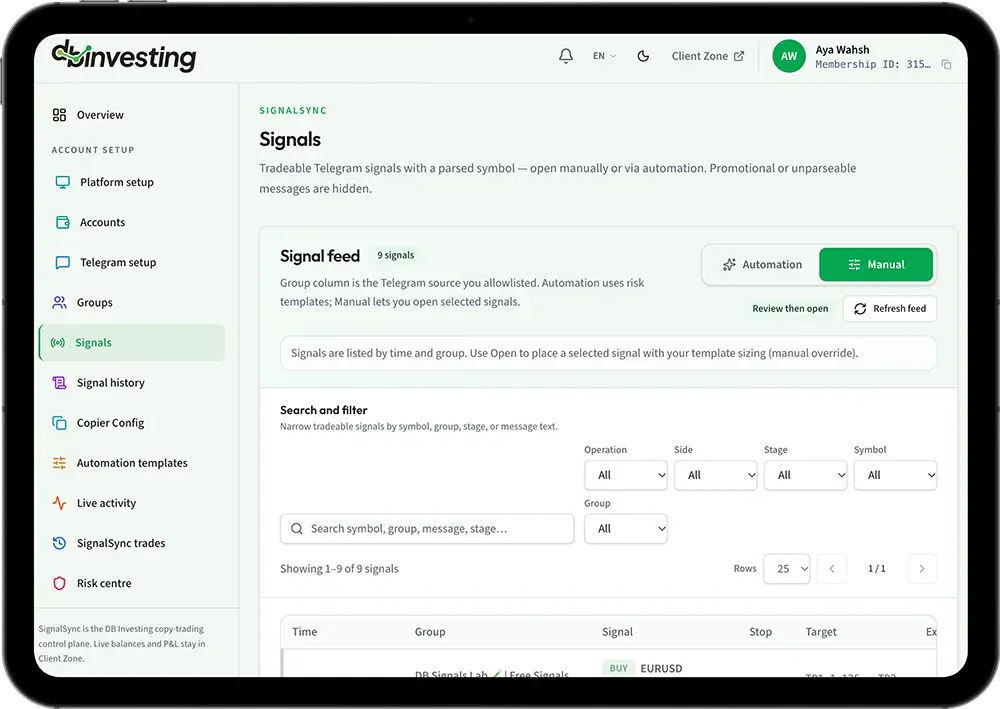
Signal Sync is DB Investing's built-in copy-trading control centre. It lives inside your Client Zone, not as a separate app, EA or download, and connects selected Telegram channels directly to your eligible MT5 accounts.
When a signal lands in a channel you're tracking, Signal Sync parses it, checks it against your automation settings, and routes it to your MT5 account. Promotional or unparseable messages are automatically hidden, so only tradeable, structured signals reach you.
Your balances and profit/loss stay exactly where they already are, in your main Client Zone dashboard. Signal Sync only manages the Telegram intake, MT5 routing and risk controls around it.
How it works
How Signal Sync Works
Automate your trading seamlessly with a straightforward process—from receiving Telegram signals to executing trades instantly on MT5.
A signal arrives in Telegram
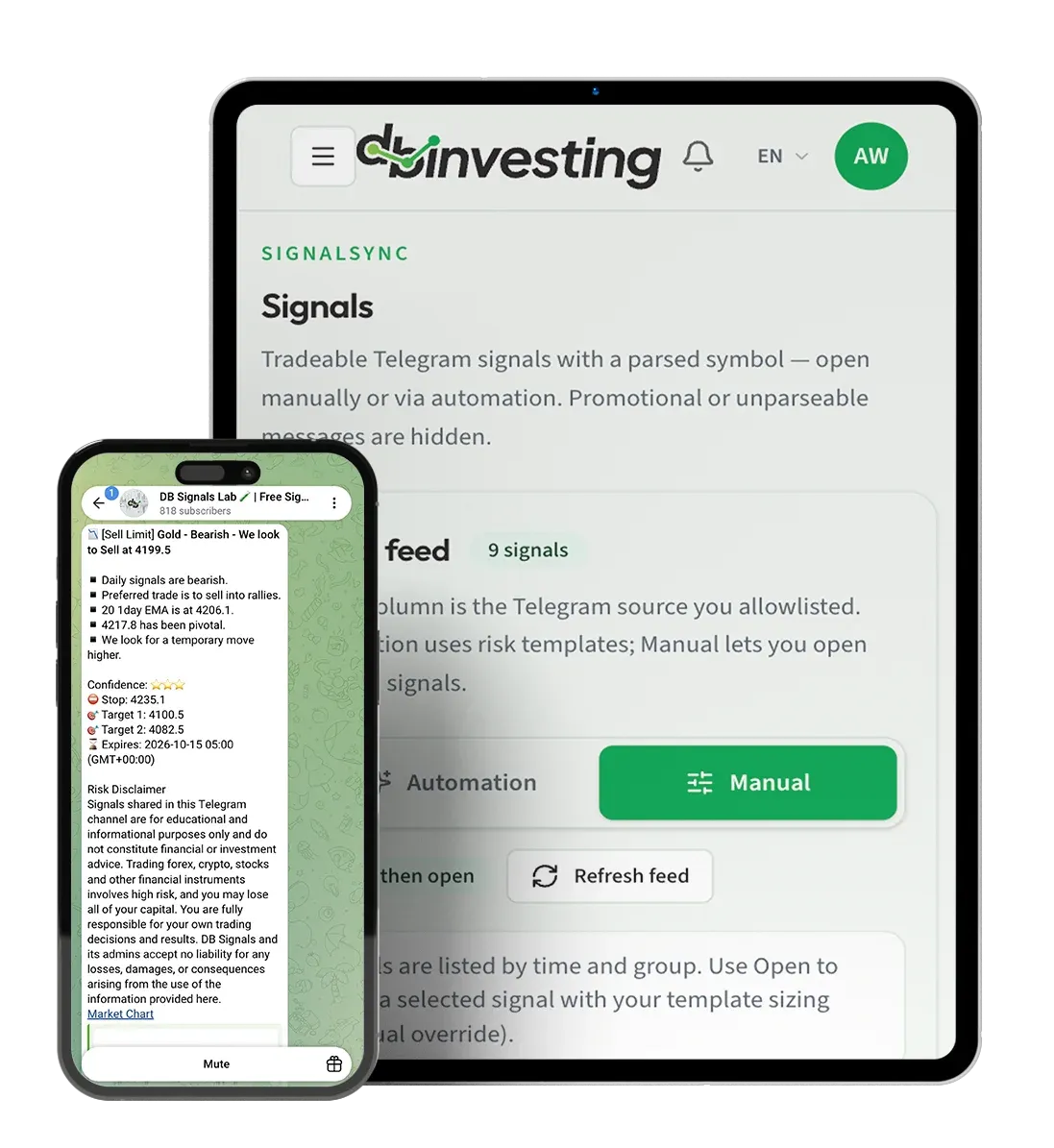
A channel you're tracking posts a trade idea, with a symbol, direction and levels.
Signal Sync parses it
The signal is read and matched to a tradeable symbol. Messages without a clear, parseable trade setup, like promotional posts, are filtered out automatically.
A safety check runs
Before anything reaches your account, Signal Sync checks your eligibility and automation settings, including whether automation is active, paused, or stopped for that account.
The trade routes to MT5
If every check clears, the trade is placed on your linked MT5 account. If automation is paused, you can still review the signal manually.
Automated Execution
No EA, No VPS, No Password Sharing
Run automated copy trading from Telegram to MT5 inside Client Zone—without installing an EA, renting a VPS, or sharing your login with an external tool.
Built into Client Zone
Everything runs from the same dashboard you already use to manage your account, no separate login or software install.
Nothing to host yourself
No VPS subscription, no EA license, no Windows application running in the background.
Your credentials Stay Yours
Signal Sync connects to eligible MT5 accounts already linked to your Client Zone. There's no MT5 password sharing with an external tool.
Core capabilities
Signal Sync Key Features
Discover all the tools and features designed to give you full control, speed, and safety over your automated copy trading
Signal capture
Telegram group selection
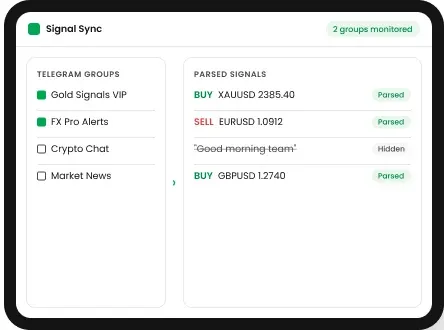
Choose exactly which Telegram channels and groups Signal Sync monitors for signals.
Smart signal parsing
Tradeable signals with a symbol are surfaced; unparseable messages are hidden.
Copier automation
Copier configuration
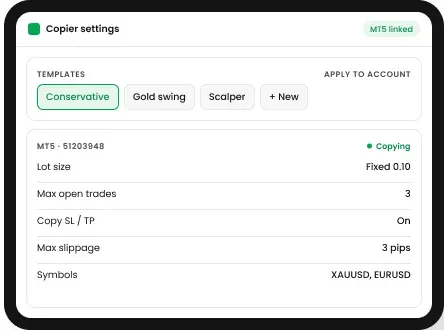
Configure how signals are copied to your linked MT5 accounts.
Automation templates
Set up reusable automation rules instead of configuring settings from scratch each time.
Signal tracking
Live activity
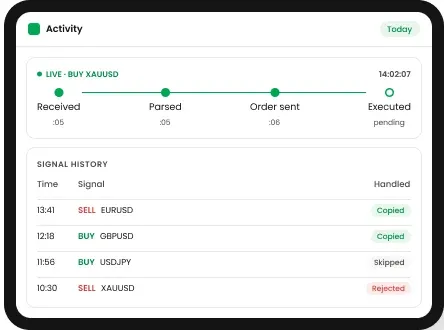
Track workflow events as they happen, from signal intake through to execution.
Signal history
Review past parsed signals to see what was received and how it was handled.
Risk management
Built-In Safety Controls
Protect your capital with flexible risk parameters, slippage limits, and instant emergency stop options
Automation kill switch
See at a glance whether signal automation is active or paused across all your linked accounts, with an Emergency Stop that immediately halts new automated orders.
Resume automated orders
Automation stays off until you explicitly turn it on for an eligible account. Pausing and the emergency stop are separate controls, so you always know exactly which state your account is in.
Close existing positions
A dedicated control closes all open positions at market on your linked live MT5 accounts. This action cannot be undone, so it's there for when you need it, not a default setting.
This isn't an optional add-on; it's the "Safety Check" step built into every signal before it reaches your account.

Why choose us
Why Use Signal Sync with DB Investing
-
One dashboard, no extra tools
Manage Telegram intake, MT5 routing and risk entirely inside Client Zone, instead of juggling a VPS, an EA and a separate terminal.
-
Built-in risk controls
Emergency stop and position-close tools are part of the product, not something you have to build or buy separately.
-
Regulated, multi-entity broker
DB Investing operates through entities regulated by the FSA (Seychelles), FSC (Mauritius) and CMA (UAE), and registered with FINTRAC (Canada).
-
Support when you need it
Reach the DB Investing team via WhatsApp, live chat, phone or email if you have questions about setup or automation settings.
Quick setup
How to Get Started in 3 Steps
Automation only works if you stay in control of it. Signal Sync's Risk Centre gives you direct, immediate oversight of every linked live MT5 account.
-
Connect Telegram
Scan the QR code, or sign in with your phone number, directly from the Signals page in Client Zone.
-
Choose your groups
Select the Telegram groups and channels you want Signal Sync to monitor.
-
Review and automate
Return to Client Zone to see live parsed signals. Trade them manually, or turn on automation once you're ready.
FAQ
Frequently Asked Questions
Find answers to the most common questions about Signal Sync, including setup, automation, risk controls, and how signals are routed to your eligible MT5 accounts.
Signal Sync is DB Investing's copy-trading control centre. It connects selected Telegram channels to your eligible MT5 accounts, so signals you already follow can be reviewed or automatically routed to your account.
No. Signal Sync runs entirely inside Client Zone. There's no Expert Advisor to install, no VPS to rent, and no separate desktop terminal required.
No. Signal Sync connects to MT5 accounts already linked to your Client Zone. You don't hand your MT5 password to any third-party tool.
Signal Sync parses incoming Telegram messages for a recognisable, tradeable symbol and structure. Promotional posts or messages without a clear trade setup are automatically hidden rather than acted on.
No. Linking your MT5 accounts and connecting Telegram does not automatically enable automated trading. Automation stays off until you explicitly turn it on for an eligible account.
The Risk Centre includes an Emergency Stop that halts new automated orders instantly, separate from simply pausing automation. There's also a dedicated control to close all existing open positions at market, though that action cannot be undone.
No. Signal Sync focuses on Telegram intake, MT5 routing and risk controls. Your live balances and profit/loss remain in your main Client Zone dashboard.
Eligibility depends on your account setup and any account-level restrictions. Your workspace summary shows your current eligibility status and the reason if automation is blocked.
Yes. If automation is paused, signals are still parsed and shown to you, so you can choose to act manually instead of relying on automatic execution.
Log in to Client Zone, go to the Signals page, and connect Telegram by scanning the QR code or signing in with your phone number. From there, choose the groups you want monitored and review your first parsed signals.
Stop Copying Signals by Hand. Let Signal Sync Do the Work.
Connect your Telegram channels to MT5 in minutes, with safety controls built in from the start.